A field guide to sandboxes for AI

Photo by Christian Weiss
Every AI agent eventually asks for the same thing:
Let me run a program.
Sometimes it’s a harmless pytest. Sometimes it’s pip install sketchy-package && python run.py. Either way, the moment you let an agent execute code, you’re running untrusted bytes on a machine you care about.
Years ago I first learned this lesson doing basic malware analysis. The mental model was blunt but useful: run hostile code in something you can delete. That makes cleanup easier, but if the code escapes, deleting the sandbox alone does not undo damage to the host or revoke stolen credentials.
AI agents recreate the same problem, except now the “malware sample” is often:
- code generated by a model,
- code pasted in by a user,
- or a dependency chain your agent pulled in because it “looked right.”
When that code runs as a native process, it becomes a kernel client. It gets whatever the kernel and policy allow: filesystem reads, network access, CPU time, memory, process creation, and sometimes GPUs.
And “escape” isn’t the only failure mode. Even without a kernel exploit, untrusted code can:
- exfiltrate secrets (SSH keys, cloud creds, API tokens),
- phone home with private repo code,
- pivot into internal networks,
- or just burn your money (crypto mining, fork bombs, runaway builds).
The request is to run a program without giving it control of the machine.
This isn’t niche anymore. Vercel, Cloudflare, and Google all offer sandboxed execution products. But the underlying technology choices are still misunderstood, which leads to “sandboxes” that are either weaker than expected or more expensive than necessary.
Part of the confusion is that AI execution comes in multiple shapes:
- Remote devbox / coding agent: long-lived workspace, shell access, package managers, sometimes GPU.
- Stateless code interpreter: run a snippet, return output, discard state.
- Tool calling: run small components (e.g., “read this file”, “call this API”) with explicit capabilities.
- RL environments: lots of parallel runs, fast reset, sometimes snapshot/restore.
These workloads need different lifecycles and isolation boundaries.
VM design has changed the choice, too. Conventional VMs often carried boot-time and memory costs that made containers attractive for densely packed, short-lived workloads. The 2020 Firecracker paper describes this tradeoff and the effort to reduce those costs.
By 2026, a suitably configured microVM can start in a fraction of a second, and snapshot/restore can avoid repeating initialization. Reset still costs storage I/O, memory, and orchestration work; its cost depends on the workload.
The other part of the confusion is the word sandbox itself. In practice, people use it to mean at least four different boundaries:
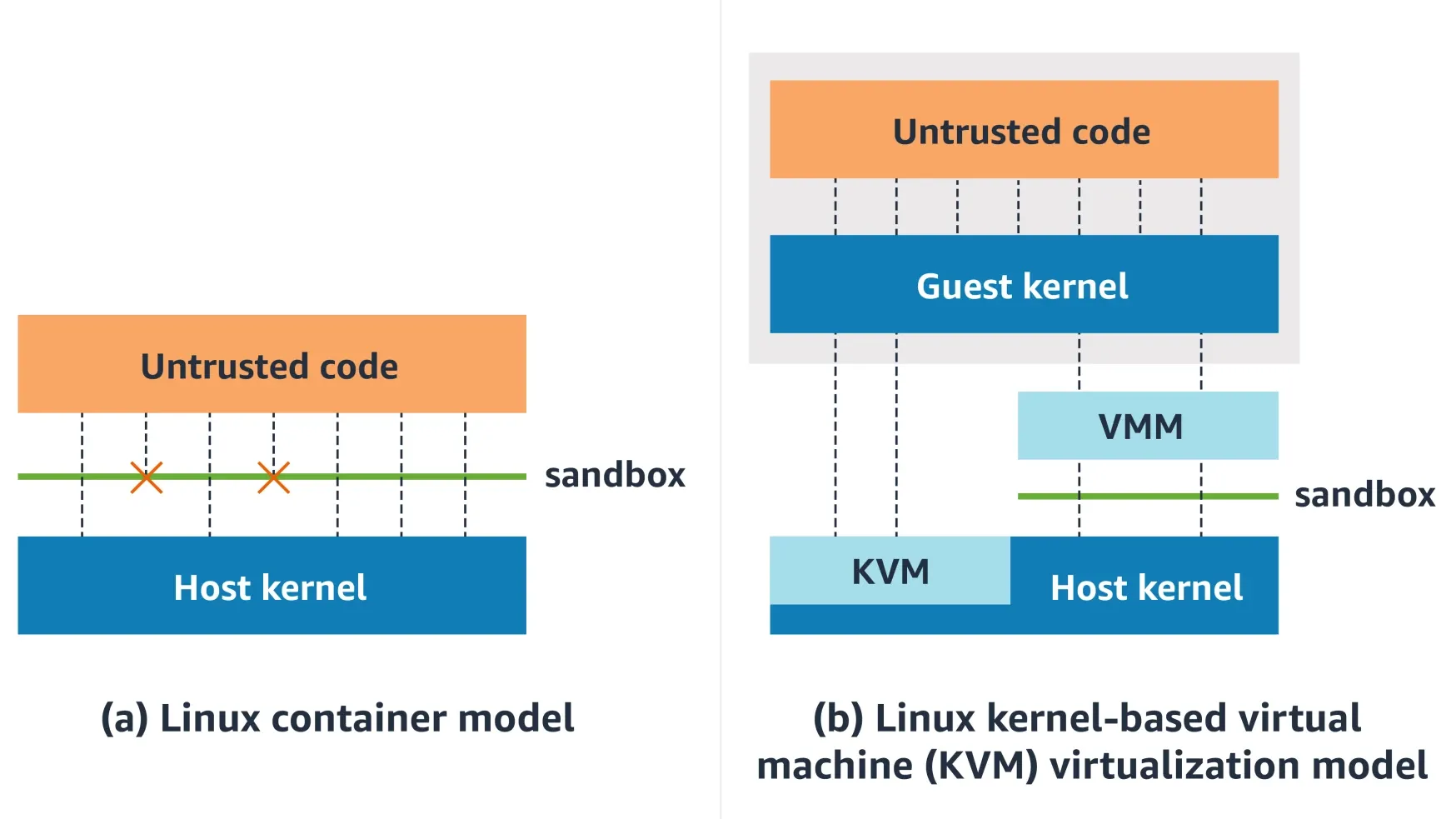
A container shares the host kernel. Allowed syscalls execute in the same kernel that serves other containers. An exploitable bug in a reachable kernel path can therefore affect the host.
A microVM runs a guest kernel behind hardware virtualization. The workload talks to its kernel. In a KVM-based microVM, the host handles virtualization and device I/O rather than dispatching the workload’s Linux syscalls directly.
gVisor interposes a userspace kernel. Application syscalls are handled by the Sentry rather than going straight to the host kernel; the Sentry itself uses a small allowlist of host syscalls.
WebAssembly / isolates constrain code inside a runtime. Wasm has no built-in filesystem or network API; an isolate’s access depends on its embedder. A capability-scoped design exposes only the host operations the workload needs.
These boundaries have different startup costs, compatibility limits, and failure modes. Pick the wrong one and you’ll either ship a “sandbox” that leaks, or a sandbox that can’t run the software you need.
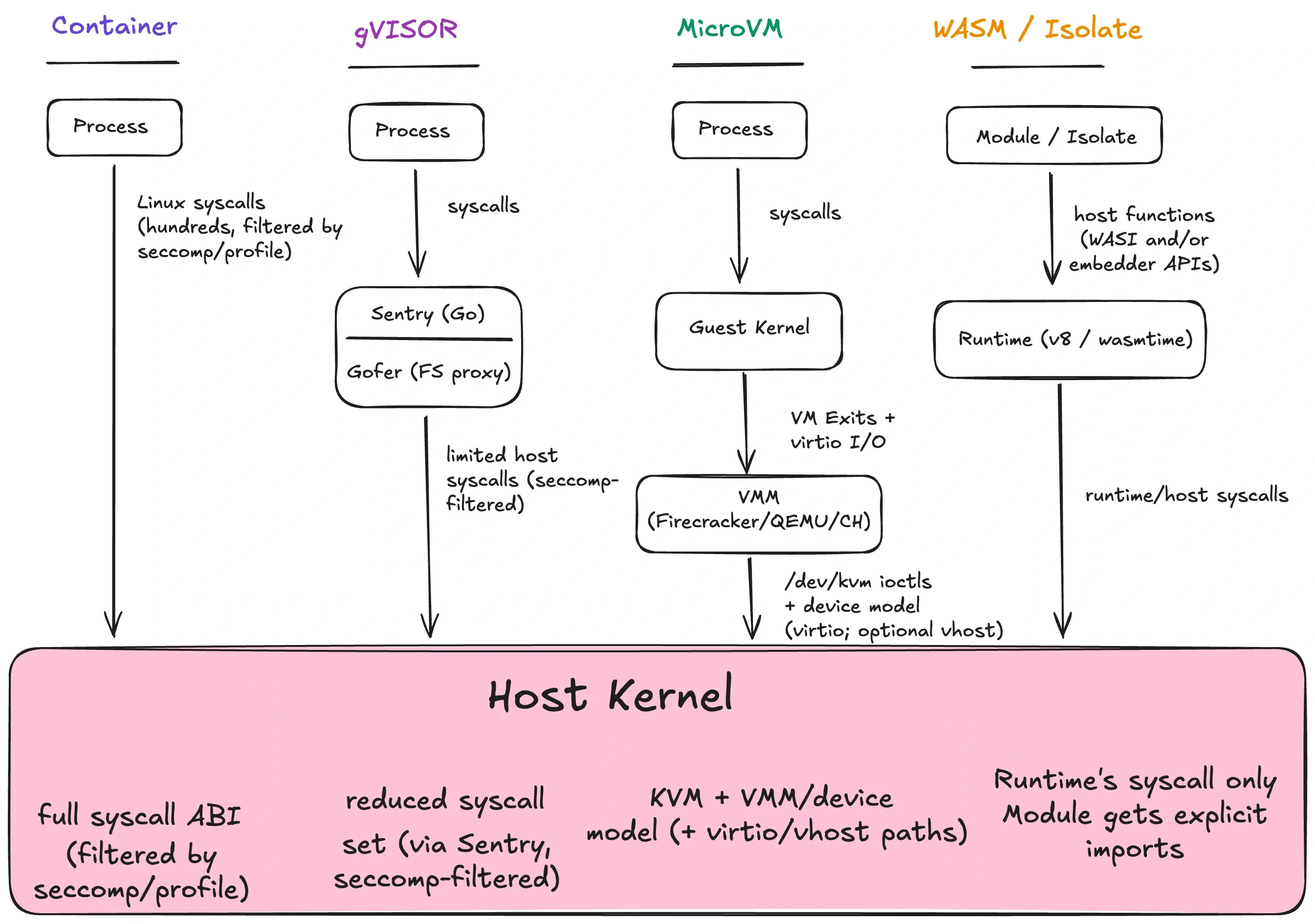
How each boundary mediates access to the host. The diagram compares interfaces, not an ordering from least to most secure.
Changing the interface changes the code responsible for protecting the host: the Sentry and its confinement in gVisor, the hypervisor and VMM in a microVM, or the runtime and embedder in Wasm. A microVM must contain even a compromised guest kernel; that kernel is not something the host should trust for its own protection. Smaller interfaces help, but implementation and configuration still determine security. gVisor security model, Firecracker threat containment.
The industry came to treat containers as the default during the mid-2010s, as Docker spread and Kubernetes made them the unit of scheduling. VMs were heavier, slower to boot, and harder to operate. Containers solved those problems with fast startup and high density, while letting you ship the same artifact everywhere.
For trusted workloads, that bet is often fine: you’re already trusting the host kernel.
AI agents change the threat model because you’re executing arbitrary code paths inside your infrastructure, often generated by a model or supplied by a user.
Containers remain an option, but choosing them requires a clearer reason than “whatever we already use.”
The three-question model
I separate sandboxing into three decisions: boundary, policy, and lifecycle. People often blur them together, which makes it easy to choose the wrong sandbox.
Boundary is where isolation is enforced. It defines what sits on each side of the line.
- Container boundary: processes in separate namespaces, still one host kernel.
- gVisor boundary: workload syscalls are serviced by a userspace kernel (Sentry) first.
- MicroVM boundary: syscalls go to a guest kernel; the host kernel sees hypervisor/VMM activity, not the guest syscall ABI.
- Runtime boundary: guest code has no syscall ABI; it can only call explicit host APIs.
The boundary is where you expect an attacker to be stopped.
Policy is what the code can touch inside the boundary:
- filesystem paths (read/write/exec),
- network destinations and protocols,
- process creation/signals,
- device access (including GPUs),
- time/memory/CPU/disk quotas,
- and the interface surface itself (syscalls, ioctls, imports).
A tight policy in a weak boundary is still a weak sandbox. A strong boundary with a permissive policy is a missed opportunity.
Lifecycle is what persists between runs, which affects both agents and RL:
- Fresh run: nothing persists. This suits hostile code but makes an “agent workspace” awkward to use.
- Workspace: a long-lived filesystem/session suits agents, but becomes dangerous if secrets leak or persistence is abused.
- Snapshot/restore: checkpointing VM or runtime state gives RL rollouts and “pre-warmed” agents a fast reset.
Lifecycle also changes your operational choices. Snapshots require support from the sandbox and its tooling; microVMs, some runtimes, and gVisor checkpoint/restore provide different versions of it. Workspaces require durable storage and a policy for secrets.
The three questions
When evaluating any sandbox, ask:
- What is shared between this code and the host?
- What can the code touch (files, network, devices, syscalls)?
- What survives between runs?
Those answers describe what your sandbox can enforce. For example:
- Multi-tenant coding agent
- Boundary: microVM (guest kernel)
- Policy: allow workspace FS, deny host mounts, outbound allowlist, no raw devices
- Lifecycle: snapshot base image, clone per session, destroy on close
Same product idea, different constraints:
- Tool calling (e.g., “format this code”)
- Boundary: Wasm component
- Policy: preopen one directory, no network by default
- Lifecycle: fresh per call
Vocabulary
Sandbox: boundary + policy + lifecycle.
Container: a packaging format plus process isolation built on kernel features. One kernel, many isolated views.
Virtual machine: a guest OS kernel running on virtual hardware.
MicroVM: a minimal VM optimized for fast boot and small footprint.
Runtime sandbox: isolation enforced by a runtime (Wasm, V8 isolates) rather than the OS.
Linux building blocks
A process is a kernel client. To compare sandbox types, we need to understand the access that gives it.
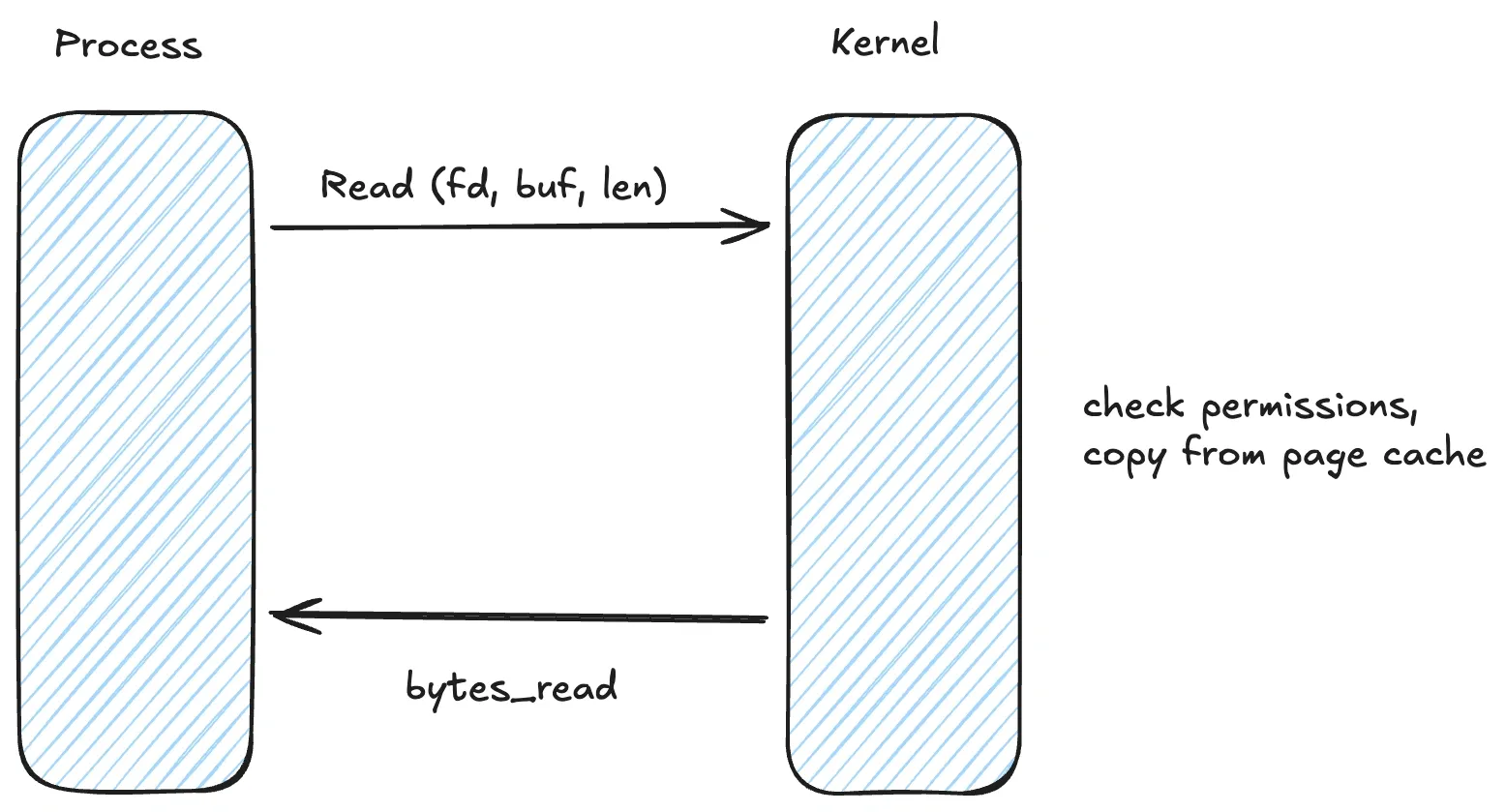
The process runs in userspace and uses syscalls for operations such as opening a file, creating a socket, or spawning a process. Memory allocators can satisfy requests from memory they already hold, so not every allocation makes a syscall. When a syscall does enter the kernel, it runs privileged kernel code. Linux allocation notes.
A reachable bug in syscall handling, filesystem code, networking code, or a device driver may allow privilege escalation or an escape. Reachability alone does not make a bug exploitable: the defect, kernel version, permissions, and enabled features all matter. Docker security model.
The process repeatedly asks the kernel to do work on its behalf. You can restrict those requests, but the kernel still runs with full privileges.
Linux containers combine four policy primitives:
Namespaces
Namespaces give a process an isolated view of selected kernel resources. Common container namespaces include:
- PID namespace: isolated process tree / PID numbering
- Mount namespace: isolated mount table / filesystem view
- Network namespace: isolated network stack (interfaces, routes, netfilter state)
- IPC/UTS namespaces: System V IPC and POSIX message queue isolation; hostname and NIS domain name isolation
- User namespace: UID/GID mappings and capability scoping
User namespaces let you map “root inside the container” to an unprivileged UID on the host. Rootless containers benefit from this distinction: an accidental “root in the container” does not automatically mean “root on the host.” The kernel is still shared, so kernel bugs remain a risk. Rootless operation also reduces the daemon’s privileges, while user-namespace remapping alone need not do so. Docker rootless mode.
Capabilities
Linux breaks “root” into capabilities (fine-grained privileges). Containers typically start with a reduced capability set, but granting the wrong capability can still expose privileged operations.
The broadest example is CAP_SYS_ADMIN, which covers a large collection of privileged operations. The Linux capabilities manual calls it “the new root” and advises against adding still more operations to it. Its authority is still scoped by namespaces and other security controls.
Review capability grants as part of the attack surface. Removing capabilities you don’t need is often the simplest improvement.
Cgroups
Cgroups (control groups) limit and account for resources:
- CPU quota/shares and CPU affinity sets
- memory limits
- I/O bandwidth / IOPS throttling
- task count, including threads (limits process/thread creation)
Cgroups are primarily about preventing resource exhaustion. They don’t materially reduce kernel attack surface.
Seccomp
Seccomp is syscall filtering. A process installs a BPF program that runs on syscall entry; it can inspect the syscall number (and, in many profiles, arguments) and decide what happens: allow, deny, log, trap, kill, or notify a supervisor.
A tight seccomp profile blocks syscalls that expand kernel attack surface or enable escalation (ptrace, mount, kexec_load, bpf, perf_event_open, userfaultfd, etc). It also tends to block legacy interfaces that are hard to sandbox safely.
A simplified “deny dangerous syscalls” seccomp rule often looks like:
{
  "defaultAction": "SCMP_ACT_ALLOW",
  "syscalls": [
    { "names": ["bpf", "perf_event_open", "kexec_load"], "action": "SCMP_ACT_ERRNO" }
  ]
}
For hostile code, I would start from an allowlist and constrain scalar arguments where possible, such as ioctl request numbers. Seccomp BPF cannot dereference pointers: clone3 passes its flags inside a pointed-to structure, so an ordinary filter cannot inspect those flags. The JSON above illustrates a denylist, not a complete sandbox policy. Seccomp filter limits, clone API.
Seccomp user notifications (SECCOMP_RET_USER_NOTIF) let the kernel pause a syscall and delegate handling to a supervisor. They can support syscall emulation, but a supervisor that checks a pathname and then lets the original call continue can race with changes to that memory or filesystem state. The Linux manual explicitly warns against treating user notifications as a security-policy mechanism.
Brokering adds latency and complexity, and the broker becomes part of the trusted computing base. Calls allowed to continue still execute in the host kernel; emulated operations depend on the supervisor’s implementation.
How containers combine these
A “container” is just a regular process configured with a set of kernel policies plus a root filesystem:
- Namespaces scope/virtualize resources.
- Capabilities are reduced.
- Cgroups cap resource usage.
- Seccomp filters syscalls on entry.
- A root filesystem provides the container’s view of
/(often layered via overlayfs). - AppArmor/SELinux may apply additional policy.
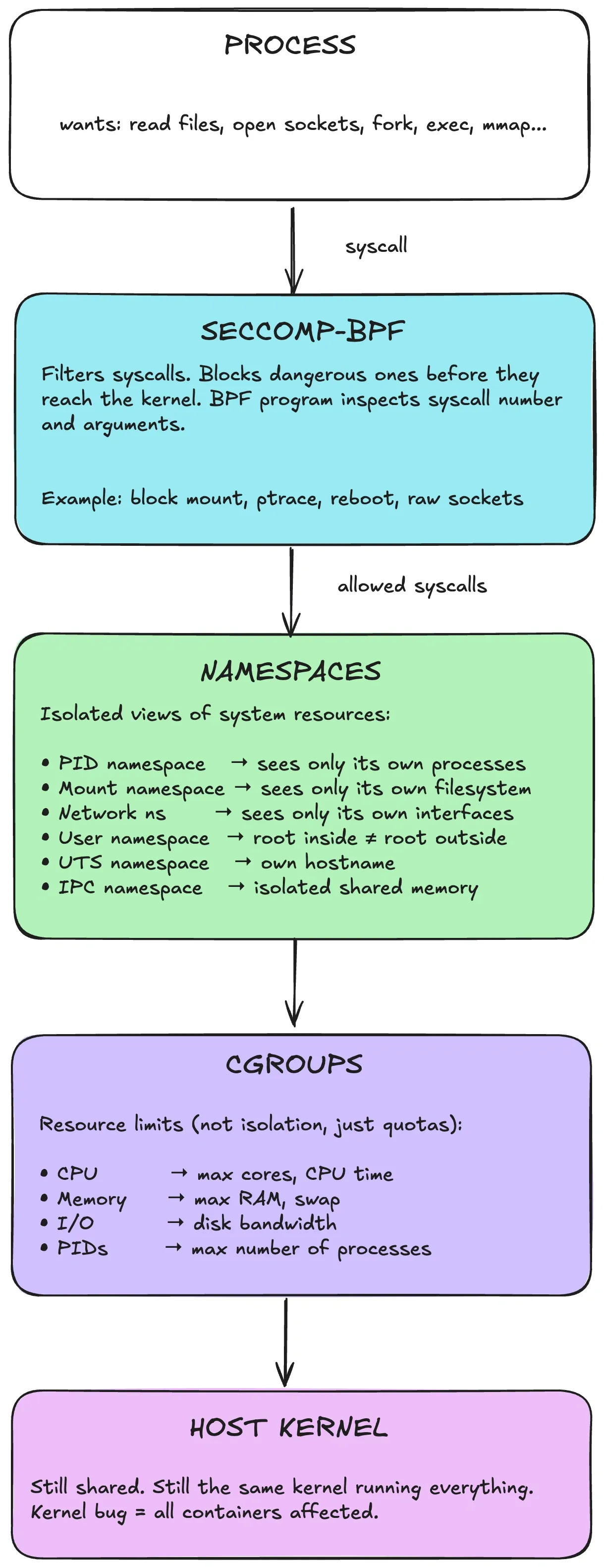
Conceptually: syscalls enter the host kernel. Seccomp can block them before dispatch. Namespaces scope resources. Cgroups enforce quotas. But it’s still the same host kernel.
This is policy-based restriction within a shared kernel boundary. You reduce what the process can see (namespaces), cap what it can consume (cgroups), and restrict which syscalls it can invoke (seccomp). The isolation is enforced by the same host kernel; no separate guest kernel or userspace syscall implementation is inserted.
Containers do provide a security boundary, enforced by kernel mechanisms. The limitation is that the same kernel serves the workloads it isolates, so a defect in that boundary can affect the host. Whether that risk is acceptable depends on the threat model.
Where containers fail
I would not rely on a conventional shared-kernel container as the sole boundary for hostile code from unrelated tenants. Hardening helps, but it leaves the host kernel shared.
The failure modes I see most often are misconfiguration and kernel/runtime bugs — plus a third one that shows up in AI systems: policy leakage.
Misconfiguration escapes
Many container escapes are self-inflicted. The runtime offers ways to weaken isolation, and people use them.
--privileged grants all capabilities, broad device access, and relaxes several confinement controls in a conventional rootful Docker deployment. It is unsuitable for the hostile-code boundary described here. Rootless Docker and containers inside a separate VM have different outer boundaries, so the flag is not universally equivalent to host root. Docker runtime privileges.
The Docker socket (/var/run/docker.sock) exposes the daemon’s authority. Unrestricted access to a rootful daemon is effectively host-root access; a rootless daemon instead carries its user’s authority. Do not expose either to code that should have less access than the daemon. Docker daemon security.
Sensitive mounts and broad capabilities are the rest of the usual list:
- writable
/sysor/proc/sys - host paths bind-mounted writable
- adding broad capabilities (especially
CAP_SYS_ADMIN) - joining host namespaces (
--pid=host,--net=host) - device passthrough that exposes raw kernel interfaces
You can address these problems by auditing configurations and banning settings that weaken isolation.
Kernel and runtime bugs
A properly configured container still shares the host kernel. If the kernel has a bug reachable via an allowed syscall, filesystem path, network stack behavior, or ioctl, code inside the container can trigger it.
Historical vulnerabilities illustrate the risk, although their applicability depends on the kernel and container configuration:
- Dirty COW (CVE-2016-5195): copy-on-write race in the memory subsystem.
- Dirty Pipe (CVE-2022-0847): pipe handling bug that could permit modification of otherwise read-only file data.
- fs_context overflow (CVE-2022-0185): a filesystem context parsing flaw whose container impact depends on reachable namespace and capability configurations.
Seccomp reduces exposure by blocking syscalls, but the syscalls you allow are still kernel code. Docker’s default seccomp profile is an allowlist designed to balance protection and application compatibility; the exact allowed set depends on the profile version, architecture, and capabilities.
And it’s not only the kernel. A container runtime bug can be enough (for example, runC overwrite: CVE-2019-5736).
Policy leakage in agent systems
A lot of “agent sandbox” failures aren’t kernel escapes. They’re policy failures.
If your sandbox can read the repo and has outbound network access, the agent can leak the repo. If it can read ~/.aws or mount host volumes, it can leak credentials. If it can reach internal services, it can become a lateral-movement tool.
Sandbox design for agents often depends more on explicit capability design than on the “strongest boundary available.” The boundary matters, but policy controls the damage when the model makes a mistake or follows a malicious prompt.
Two practical notes:
- Rootless/user namespaces help. They reduce the damage from accidental privilege. They don’t make kernel bugs go away.
- Multi-tenant workloads require a different assumption. If you run code from different trust domains on the same kernel, you should assume someone will try to hit kernel bugs and side channels, even if “it’s only build code.”
ioctl exposes a large attack surface. Even if you block dangerous syscalls, many kernel interfaces live behind ioctl() on file descriptors (filesystems, devices, networking). Passing through devices, especially GPUs, exposes large driver code paths to untrusted input.
A container interface can sit on top of another boundary. For example, GKE Agent Sandbox documents gVisor isolation, while Vercel Sandbox uses Firecracker microVMs.
Containers work well when all code inside the container is in the same trust domain as the host, as is often true when you’re running your own services.
The moment you accept code from outside your trust boundary (users, agents, plugins), treat “shared kernel” as a conscious risk decision — not as the default.
Hardening options
Hardening tightens policy. It doesn’t change the boundary.
| Hardening measure | What it does | What it doesn’t do |
|---|---|---|
| Custom seccomp | blocks more syscalls/args than defaults | doesn’t protect against bugs in allowed kernel paths |
| AppArmor/SELinux | constrains filesystem/procfs and sensitive ops | doesn’t fix kernel bugs; it only reduces reachable paths |
| Drop capabilities | removes privileged interfaces (avoid SYS_ADMIN) | doesn’t change shared-kernel boundary |
| Read-only rootfs | prevents writes to container root | doesn’t prevent in-memory/kernel exploitation |
| User namespaces | maps container root to unprivileged host UID | kernel bugs may still allow escalation |
You can harden a container until it’s nearly unusable, but the few syscalls you allow still run privileged code in the shared host kernel.
If your threat model requires containing compromise of the kernel visible to the workload, consider an additional boundary:
- gVisor: syscall interposition
- microVMs: guest kernel behind virtualization
- Wasm/isolates: no syscall ABI at all
Stronger boundaries
Containers share a fundamental constraint: the workload’s syscalls go to the host kernel. To actually change the boundary, you have two main approaches:
- Syscall interposition: intercept syscalls before they reach the host kernel, reimplement enough of Linux in userspace
- Hardware virtualization: run a guest kernel behind a VMM/hypervisor, reduce host exposure to VM exits and device I/O
gVisor
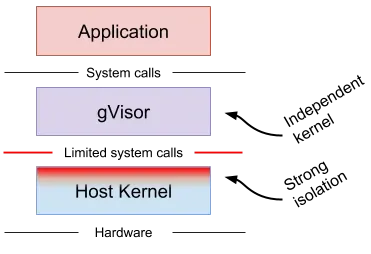
gVisor is an “application kernel” that intercepts syscalls (and some faults) from a container and handles them in a userspace kernel called the Sentry.
If containers are “processes in namespaces,” gVisor is “processes in namespaces, but their syscalls don’t go straight to the host kernel.”
A few implementation details matter when you’re choosing it:
- gVisor integrates as an OCI runtime (
runsc), so it drops into Docker/Kubernetes. - The Sentry implements kernel logic in Go: syscalls, signals, parts of
/proc, a network stack, etc. - Interception is done by a gVisor platform. systrap replaced ptrace as the default in mid-2023; KVM is another option. The current documentation describes ptrace as unsupported. Platform guide.
Two subsystems dominate gVisor’s performance and security behavior:
Filesystem mediation (Gofer / LISAFS). The Gofer is a separate process; LISAFS is the protocol it uses to communicate with the Sentry. Current runsc enables directfs by default: the Gofer supplies directory file descriptors, and the Sentry can perform constrained filesystem operations on those trees directly. Disabling directfs routes those operations through the Gofer and permits stricter confinement at a performance cost. Filesystem guide.
Networking (netstack vs host). gVisor can use its own userspace network stack (“netstack”) and avoid interacting with the host network stack in the same way a container would. Host-networking modes trade some of that separation for different compatibility and performance behavior. Networking guide.
The security point is that the workload no longer chooses which host syscalls to call. The Sentry does, and the Sentry itself can be constrained to a small allowlist of host syscalls. A 2019 gVisor article reported 53 host syscalls without networking, plus 15 more with networking (68 total). Those are historical configuration-specific counts, not a current guarantee; platform, filesystem, networking, and device support affect the host interface.
Constraining that interface has costs:
- Compatibility: not every syscall and kernel behavior is identical. Check the syscall compatibility table against what your workload needs.
- Overhead: syscall interposition adds work. Syscall-heavy workloads can pay more; filesystem costs depend on whether operations use Gofer RPCs or directfs. Measure the actual configuration. Performance guide.
- Debuggability: failure modes include
ENOSYSfor unimplemented calls, or subtle semantic mismatches.
I would choose gVisor when I can tolerate “Linux, but with a compatibility matrix,” and want a materially smaller host-kernel interface than a standard container.
MicroVMs
The alternative to syscall interposition is hardware isolation. Run a guest kernel behind hardware virtualization (KVM on Linux, Hypervisor.framework on macOS). For KVM-based VMMs, the host handles virtualization operations and the host-side I/O needed by the VMM, rather than dispatching individual workload syscalls. KVM API.
This is why I would start with microVMs for running arbitrary Linux code from unrelated users. A Linux guest supplies its own syscall implementation, though compatibility still depends on the guest kernel, CPU architecture, and supported devices.
What the host kernel actually sees
A microVM still uses the host kernel, but the interface changes shape:
- VMM makes
/dev/kvmioctls to create vCPUs, map guest memory, and run the VM. - Guest interacts with virtual devices (virtio-net, virtio-blk, vsock). Those devices are implemented by the VMM (or by backends like vhost-user).
- Some guest events, including selected privileged operations and device accesses, cause VM exits. KVM handles some exits in the host kernel and returns others to the VMM. Not every exit reaches userspace.
The host kernel still mediates access, but through a narrower, more structured interface than the full Linux syscall ABI.
What microVMs don’t solve by themselves
A guest kernel boundary still needs an explicit policy:
- Does the guest have outbound network access?
- Does it mount secrets or credentials?
- Does it have access to internal services?
- Does it share any filesystem state between runs?
A microVM can provide a strong boundary and still allow data exfiltration if its policy permits it.
MicroVM orchestration can use several lifecycle patterns:
- Ephemeral session VM: boot → run commands → destroy. Simple and dependable.
- Snapshot cloning: boot a “golden” VM once (language runtimes, package cache) → snapshot → clone per session. Fast cold start and fast reset.
- Fork-and-exec style: keep a pool of paused/suspended VMs, resume on demand. Operationally trickier but can reduce tail latency.
State injection is also a design choice, not a given:
- Block device images (ext4 inside a virtio-blk) are a simple way to supply state; they’re portable and work well with snapshots.
- virtio-fs / 9p-like shares: share a host directory into the guest (useful for “workspace mirrors,” but it reintroduces host FS as part of the policy surface).
- Network fetch: pull code into the guest from an object store/Git remote. Keeps host FS out of the guest boundary, but requires network policy.
Common network policies include:
- NAT + egress allowlist: provide outbound connectivity while restricting destinations. NAT alone is not an egress policy.
- No direct internet: force all traffic through a proxy that enforces policy and logs.
- Dedicated VPC/subnet: isolate “untrusted execution” away from internal services.
If you also need to protect guest data from the infrastructure operator, examine confidential computing (SEV-SNP/TDX) and Confidential Containers. That requires a suitable trusted-computing base, attestation, and policy for releasing secrets; enabling a VM alone does not provide those guarantees.
What is a VMM?
For a Linux VM using KVM, two layers matter here:
- KVM (in kernel): turns Linux into a hypervisor and exposes virtualization primitives via
/dev/kvmioctls. - VMM (userspace): allocates guest memory, configures vCPUs, and provides the virtual devices the guest uses.
QEMU is the classic general-purpose VMM, with a large device set and extensive code for legacy hardware. That flexibility is useful, but it adds attack surface and operational cost.
MicroVM VMMs use fewer devices and emulation paths, with a smaller footprint and faster boot.
The device model is the new interface
Moving from “container syscalls” to “microVM” shifts attack surface rather than eliminating it.
The attack surface now includes:
- KVM ioctl handling in the host kernel,
- the VMM process (its parsing of device config, its event loops),
- and the virtual device implementations (virtio-net, virtio-blk, virtio-fs, vsock).
This is why microVM VMMs are aggressive about minimal devices. Every device you add is more parsing, more state machines, more edge cases.
With microVMs, you also have two kernels to patch:
- the host kernel (KVM and related subsystems),
- and the guest kernel, which is exposed to the workload.
The workload may also reach virtual-device interfaces directly when its privileges and guest configuration permit it; a guest-kernel compromise is not a prerequisite for every VMM attack.
The guest kernel can be slimmer than a general distro kernel: disable modules you don’t need, remove filesystems you don’t mount, avoid exotic drivers. This doesn’t replace patching, but it shrinks reachable code.
Virtio, but which flavor?
Virtio devices can be exposed via different transports. Firecracker traditionally used virtio-mmio; the current development documentation also describes optional PCI transport and device hotplug under a developer-preview label. cloud-hypervisor uses virtio-pci. Check the release you deploy rather than treating “Firecracker means no PCI” as a permanent property. Guest tooling, drivers, and passthrough requirements determine which transport fits. Firecracker device hotplug, cloud-hypervisor device model.
“MicroVM” describes a design stance: remove legacy devices and keep the device model small.
Firecracker
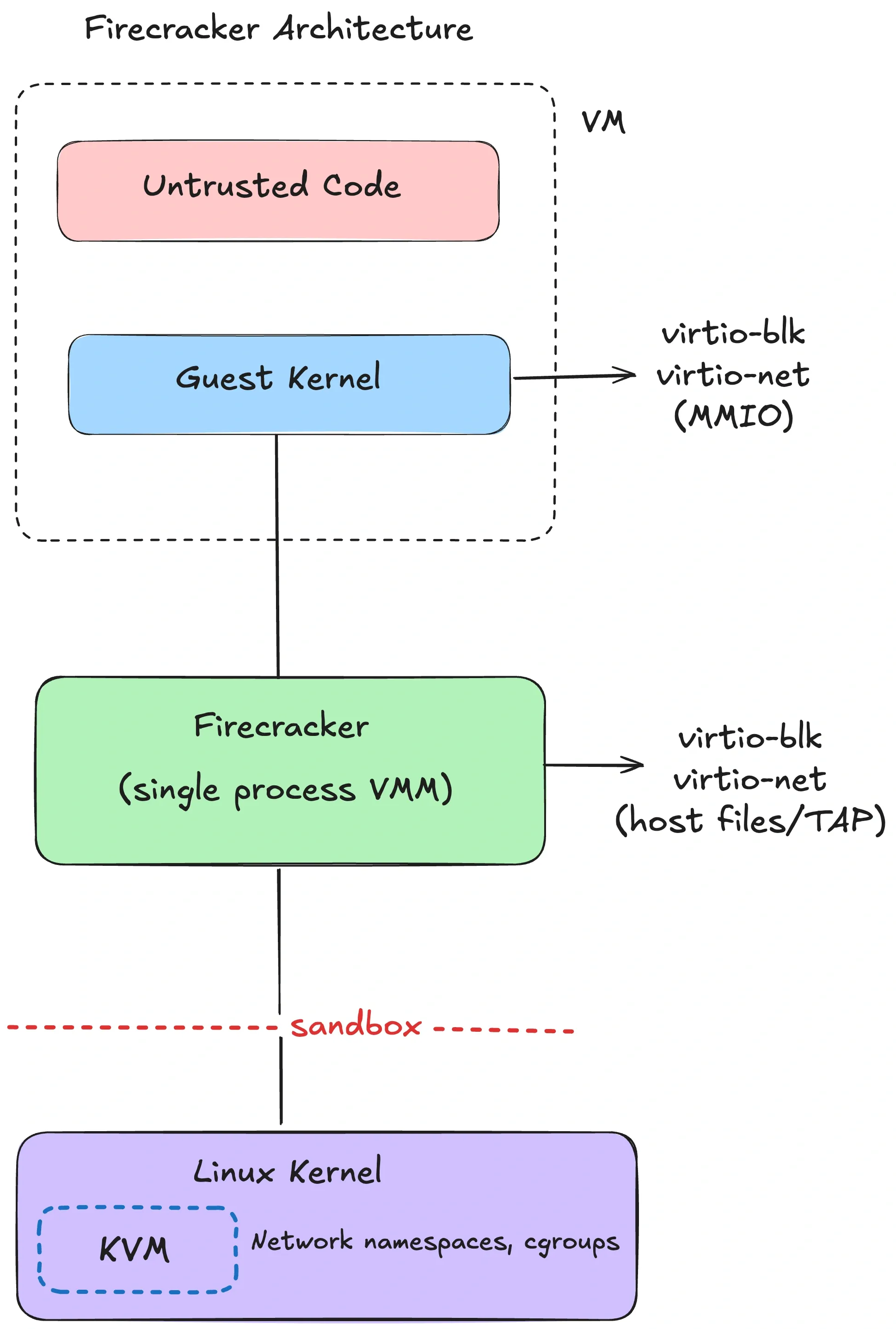
Firecracker is AWS’s minimalist VMM for multi-tenant serverless (Lambda, Fargate). It’s purpose-built for running lots of small VMs with tight host confinement.
Firecracker uses:
- one Firecracker process per microVM,
- a deliberately limited device model, including virtio net, block, and vsock devices plus a serial console; current versions have additional optional devices, such as virtio-rng. The serial console is not a virtio-console device. Device matrix.
- and a “jailer” that sets up isolation for the VMM process before the guest ever runs.
Internally you can think of three thread types:
- an API thread (control plane),
- a VMM thread (device model and I/O),
- vCPU threads (running the KVM loop).
Firecracker applies several layers of isolation around the VMM:
- The jailer sets up filesystem confinement and cgroups, drops privileges, and execs the VMM. Network-namespace joining and a new PID namespace depend on its options. Jailer documentation.
- Firecracker installs per-thread seccomp filters before guest execution. The 2020 NSDI paper reported 24 syscalls (with argument filtering) and 30 ioctls. Current filters vary by architecture, thread, and release. Seccomp documentation.
A Firecracker microVM is configured with a small API surface (an HTTP API over a Unix-domain socket). Typical “remote devbox” products build lifecycle management around that API: boot, snapshot, restore, pause, resume, collect logs.
For Firecracker, inject workspace state through a supported mechanism such as a file-backed block device or a transfer service inside the guest. Its documented device set does not include virtio-fs; that option belongs to other VMMs, including cloud-hypervisor and libkrun. Firecracker devices, cloud-hypervisor filesystem sharing.
Snapshot/restore avoids repeated initialization for agents and RL:
- Agents: you can pre-warm a base image (language runtimes, package cache) and clone quickly.
- RL: you can reset to a known state without replaying a long initialization sequence.
Firecracker snapshots preserve guest memory and VM state, while the caller must manage the corresponding disk files. Cloning also needs care around entropy, identities, and network connections; not every connection survives restore, and host/CPU compatibility matters. Snapshot support and limitations.
Firecracker also has limits:
- Firecracker focuses on modern Linux guests. It intentionally avoids a lot of “PC compatibility” hardware.
- The device set is minimal by design. If your workload depends on obscure devices or kernel modules, you’ll either adapt the guest or choose a different VMM.
- Debugging looks more like “debug a tiny VM” than “debug a container.” You’ll want good serial console logs and metrics from the VMM.
Firecracker’s performance specification defines 125ms as the interval from the InstanceStart API call to starting the guest’s /sbin/init, using a minimal kernel/rootfs with the serial console disabled. It excludes provisioning the surrounding control plane, storage, and network. Measure end-to-end cold start in your stack.
cloud-hypervisor
cloud-hypervisor is also a Rust VMM, built from the same rust-vmm ecosystem, but it targets a broader class of “modern cloud VM” use cases.
Its documented features include:
- PCI-based virtio devices (no virtio-mmio)
- CPU/memory/device hotplug
- optional vhost-user backends (move device backends out-of-process)
- VFIO passthrough (including GPUs, with the usual IOMMU/VFIO constraints)
- Windows guest support
cloud-hypervisor is an option when you need a VM boundary and PCI device passthrough. GPU compatibility depends on the device, guest drivers, and host configuration. The project advertises boot-to-userspace under 100ms with direct kernel boot; that is not an end-to-end startup guarantee. Its README and device model describe the supported guests, hotplug, and VFIO interfaces.
A caution on GPU passthrough: VFIO gives the guest much more direct access to hardware. That can be necessary and still safe, but it changes the failure modes. You now care about device firmware, IOMMU isolation, and hypervisor configuration in ways you don’t in “CPU-only microVM” designs. One design option is to keep general code execution in CPU-only microVMs and expose model execution through a separate GPU service. VFIO isolation itself depends on the hardware’s IOMMU groups and device behavior. Linux VFIO documentation.
libkrun
libkrun takes a different approach: it’s a minimal VMM embedded as a library with a C API. It uses KVM on Linux and Hypervisor.framework on macOS/ARM64.
libkrun is used by tools that run containers inside lightweight VMs on laptops, where local agents are becoming a common workflow. Its documented use cases include krunkit, which uses Venus for GPU-enabled VMs on macOS. Venus forwards Vulkan operations through virtio-gpu; MoltenVK implements a subset of Vulkan over Metal on Apple platforms. Support depends on that graphics stack, not just on enabling virtualization.
Embedding a VMM does not remove it from the trusted computing base. The embedding process needs confinement and a policy for shared filesystems and network access; the libkrun project itself describes its isolation as partial. A standalone VMM also needs host-side confinement. In particular, libkrun’s virtio-fs sharing does not itself restrict the guest to the named host directory; the embedding application must add host filesystem isolation. Its TSI networking likewise uses the VMM’s network authority. libkrun security model.
Comparing microVM implementations
| VMM | Best at | Not great at |
|---|---|---|
| Firecracker | multi-tenant density, tight host confinement, snapshots | general VM features, GPU passthrough |
| cloud-hypervisor | broader VM feature set; VFIO/hotplug; Windows support | smallest possible surface area |
| libkrun | lightweight VMs on dev machines (especially macOS/ARM64) | large-scale multi-tenant control planes |
gVisor vs microVMs
If you’re choosing between “syscall interposition” and “hardware virtualization,” the practical tradeoffs are:
- Compatibility: a Linux microVM runs a real guest kernel, subject to its configuration and device support. gVisor implements a subset of Linux behavior. Validate either against the workload.
- Overhead: gVisor avoids running a guest kernel; microVMs pay for a guest kernel and VMM (but can still be fast).
- Attack surface: gVisor bets on a userspace kernel implementation and a small host syscall allowlist; microVMs bet on KVM + VMM device surface.
The threat model and workload profile usually determine which cost you can accept.
Kata Containers
Kata solves a common operational constraint: “I want to keep my container workflow, but I need VM-grade isolation.”
Kata Containers is an OCI-compatible runtime that runs containers inside a lightweight sandbox VM (often at the pod boundary in Kubernetes: multiple containers in a pod share one VM).
A Kata pod starts through the container runtime; the exact storage and transport choices depend on the hypervisor and its Kata integration. The architecture guide describes the sequence:
- containerd/CRI creates a pod sandbox using a Kata runtime shim,
- the shim launches a lightweight VM using a configured hypervisor backend (QEMU, Firecracker, cloud-hypervisor, etc),
- a
kata-agentinside the guest launches and manages the container processes, - container root filesystems reach the guest through a storage path supported by that backend, such as virtio-fs or block storage,
- networking and vsock are provided via virtio devices.
The appeal is container ergonomics with a guest-kernel boundary. The cost is overhead: each sandbox VM carries a guest kernel plus VMM/device mediation, and boot adds latency.
Kata makes sense when you’re running mixed-trust workloads on the same Kubernetes cluster and you want a VM boundary without rewriting your platform.
Operationally, Kata is usually introduced via Kubernetes RuntimeClass: some pods use the default runc container runtime; untrusted pods use the Kata runtime class. That lets you select different runtimes within one cluster, provided the nodes and runtime handlers are configured for them. Kubernetes RuntimeClass.
Confidential Containers builds on Kata to use confidential VMs, including SEV-SNP/TDX deployments. This addresses a different trust requirement: protecting guest data from parts of the infrastructure, with attestation and secret-release policy as part of the design.
Runtime sandboxes
Containers, gVisor, and microVMs all run “code as a process,” so the guest sees some syscall ABI (host kernel, userspace kernel, or guest kernel).
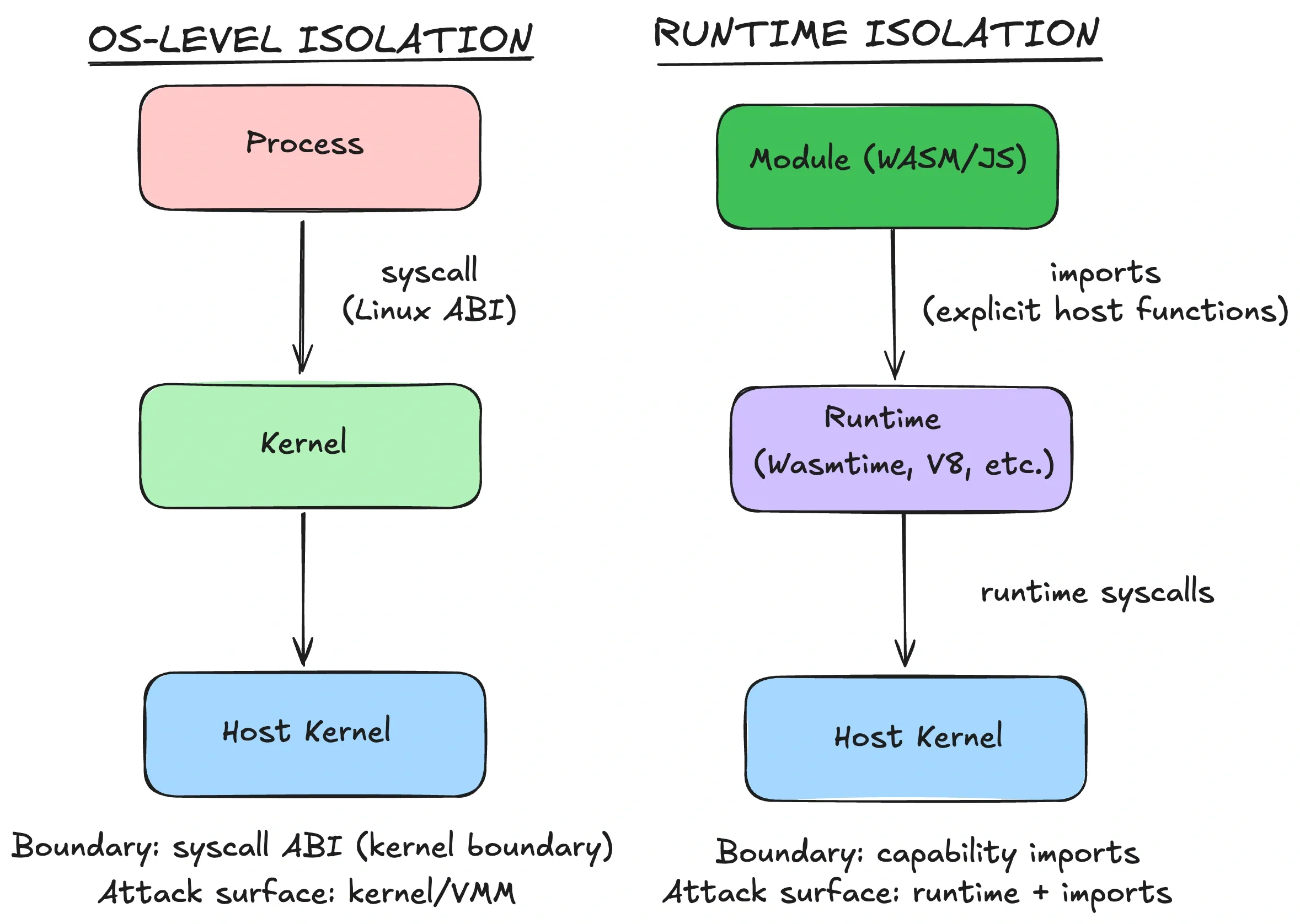
In a runtime sandbox, the runtime enforces the code boundary. Wasm modules and JavaScript isolates cannot issue arbitrary native syscalls directly, but their effective authority depends on the interfaces supplied by the host and embedder. A native-code or FFI escape hatch changes that assumption.
WebAssembly
WebAssembly defines no built-in syscall, filesystem, or network API. Interaction with the environment comes through imports and other resources supplied by the host. That makes a restricted capability policy possible; it does not make every embedding secure by default. WebAssembly portability.
Wasm runtimes enforce:
- memory bounds: accesses outside a linear memory trap. This does not prevent memory corruption between objects inside that memory, and a host can deliberately share memory.
- constrained control flow: no arbitrary jumps to raw addresses.
- no built-in OS API: host calls are explicit imports.
These properties depend on a correct runtime/compiler implementation. WebAssembly security model.
WASI (WebAssembly System Interface) extends this with capability-oriented interfaces. Preopened directories give a module handles to selected subtrees. Path resolution through a handle must stay within its permitted directory, including when resolving .. or symlinks. WASI filesystem interface.
The host can grant read/write access to ./workspace as /work and expose an HTTP function restricted to https://api.github.com. The embedder implements that policy; WASI does not define a universal allowNet call, and allowing TCP port 443 alone does not enforce HTTPS or a hostname.
Keep ~/.ssh outside every granted subtree. Preopening the home directory or / can expose it without a dedicated .ssh preopen, and another host import may expose the same data. The directory capability prevents traversal beyond its boundary; it cannot repair an overly broad grant or a faulty host function. Wasmtime directory capabilities.
There is no guest OS to boot, so instantiation can be fast once compilation and linking are done. Those are separate costs, as are application initialization and the work a host import performs. Measure total startup rather than applying an instantiation benchmark to the whole request. Wasmtime performance measurements.
Runtime sandboxes still need resource accounting: isolation doesn’t stop infinite loops or exponential algorithms, so you need CPU/time limits. Wasmtime can meter execution with opt-in “fuel”, providing a deterministic bound on Wasm execution. Fuel does not interrupt a blocking host function; host calls need their own deadlines and resource limits. Wasmtime interruption limits.
The limitations often show up as “I need one more host function”:
- Your import surface defines the module’s authority outside the runtime. A broad
runCommand()host call can undo the restrictions you intended, even if memory isolation works correctly. - Keep imports narrow and typed. Prefer structured operations (“read file X from preopened dir”) over generic ones (“open arbitrary path”).
Wasm’s component model is one reason it keeps appearing in agent tooling. Core Wasm already has typed imports and exports. Components add richer interface types and cross-language composition, encouraging smaller tools with explicit inputs and outputs. Component model. That suits capability-scoped AI tools, provided the host doesn’t accidentally grant ambient authority through an overly broad host function.
Other constraints include:
- Threads exist, but support varies by runtime and platform.
- Check which WASI socket and HTTP interfaces your runtime and toolchain support; support is not uniform across versions.
- Dynamic languages usually require interpreters (Pyodide, etc).
- Anything that expects “normal Linux” (shells, package managers, arbitrary binaries) doesn’t port cleanly.
Major runtimes include:
- Wasmtime (Bytecode Alliance): security-focused, close to WASI/component-model work.
- Wasmer: runtime plus tooling ecosystem, with WASIX for more POSIX-like APIs.
- WasmEdge: edge/cloud-native focus.
V8 isolates (and deny-by-default runtimes)
A V8 isolate is an engine instance with its own heap; contexts provide separate JavaScript global environments inside it. The embedder decides which host functions and communication mechanisms are exposed. V8 embedding guide.
Cloudflare Workers uses isolates to run multiple workloads within processes, but its protection also includes process grouping, a namespace/seccomp sandbox, brokered I/O, and mitigations for timing side channels. These are properties of Cloudflare’s design, not automatic guarantees of any V8 embedding. Workers security model.
Deno exposes a related permission model (--allow-read, --allow-net, --allow-run) for application I/O. Code on the same thread shares privileges; permissions do not isolate each imported module. Subprocesses and native FFI can operate outside those runtime restrictions, so arbitrary untrusted code still needs OS or VM confinement. Module loading also has rules distinct from application I/O permissions. Deno security model.
The limitation is scope: isolates are for JS/TS (and embedded Wasm). If your sandbox needs arbitrary ELF binaries, this isn’t the tool.
Runtime sandbox examples for AI tools
These systems use Wasm to isolate tools rather than provide a whole development environment:
- Microsoft Wassette: runs Wasm Components via MCP with a deny-by-default permission model.
- NVIDIA: describes using Pyodide (CPython-in-Wasm) to run LLM-generated Python in the browser. Browser execution is not equivalent to a deny-by-default capability policy: Pyodide can interact with JavaScript, so page data and exposed APIs still need consideration. Pyodide interoperability.
- Extism: a Wasm plugin framework with manifest controls for hosts and paths, plus explicitly supplied host functions.
When runtime sandboxes are enough
Runtime sandboxes fit a specific profile:
| Constraint | Runtime sandbox strength |
|---|---|
| Stateless execution | a useful fit for isolated tool calls |
| Cold start / density | potentially low overhead; measure compilation and startup too |
| Full Linux compatibility | no (explicit host APIs only) |
| Language flexibility | limited (Wasm languages / JS) |
| GPU access | through host-provided APIs (e.g., WebGPU), if the embedder exposes them |
If the product needs a full userspace and arbitrary binaries, you’ll end up back at microVMs or gVisor. For running small tools safely, runtime sandboxes can be the simplest option.
Choosing a sandbox
Most selection mistakes come from skipping the boundary question and jumping straight to implementation details.
I work through four questions:
- Threat model: is this code trusted, semi-trusted, or hostile? Does a kernel exploit matter?
- Compatibility: do you need full Linux semantics, or can you live inside a capability API?
- Lifecycle: do you need fast reset/snapshots, or long-lived workspaces?
- Operations: can you run KVM and manage guest kernels, or are you constrained to containers?
For common AI workloads, that leads to these choices:
| Workload | Threat model | Compatibility needs | Recommended boundary |
|---|---|---|---|
| AI coding agent (multi-tenant SaaS) | hostile (user-submitted code) | full Linux, shell, package managers | microVM (Firecracker / cloud-hypervisor) |
| AI coding agent (single-tenant / self-hosted) | depends on inputs and the value of local data | full Linux | hardened container, gVisor, or microVM according to risk |
| RL rollouts (parallel, lots of resets) | depends on environment code and agent access | fast reset, snapshot/restore | microVM with snapshot support, or another verified reset mechanism |
| Code interpreter (stateless snippets) | hostile | scoped capabilities, no shell | gVisor or runtime sandbox (if language fits) |
| Tool calling / plugins | mixed | explicit capability surface | Wasm / isolates |
An agent may run code in response to untrusted input, including prompt injection or compromised dependencies. Classify that code by what an adversary can influence, not by whether the agent or service belongs to you. “Single-tenant” does not automatically mean “trusted.”
Blocking the network is another common answer, but network restrictions don’t establish an isolation boundary. Hostile code can still exploit a shared kernel without network access.
Before picking a boundary, I also write down the minimum policy I need to enforce. I wouldn’t call it a sandbox without these controls:
- Default-deny outbound network, then allowlist. (Or route everything through a policy proxy.)
- No long-lived credentials in the sandbox. Use short-lived scoped tokens.
- Workspace-only filesystem access. No host mounts besides what you explicitly intend.
- Resource limits: CPU, memory, disk, timeouts, and PIDs.
- Observability: log process tree, network egress, and failures. Sandboxes without telemetry become incident-response theater.
If I were starting from scratch, I would use these defaults:
- MicroVMs for multi-tenant AI agent execution, or when code I don’t fully trust needs a shell and package managers. Firecracker suits density and a tight VMM surface; cloud-hypervisor suits VFIO/hotplug/GPU.
- gVisor when its compatibility limits are acceptable and I want to save overhead. It’s a good middle ground if I already run Kubernetes.
- Hardened containers for trusted/internal automation, where they’re usually sufficient.
- Wasm or isolates for tools that can be expressed as capability-scoped operations.
Then measure cold-start time and steady-state throughput, and assess operational complexity. MicroVMs can be cheap at scale, but only if your orchestration is built for it.
Choose the boundary by identifying what would have to fail for an escape to happen.
Appendix: Local OS sandboxes
Everything above assumes you’re running workloads on a server. Local agents (Claude Code, Codex CLI, etc.) run on your laptop, where they can see your filesystem. Prompt injection can influence an agent to read ~/.ssh or delete files when its tools have that authority, without needing a “kernel 0-day.”
Each major OS has mechanisms for restricting a process within the host kernel boundary. Their supported interfaces, privilege requirements, and resource controls differ.
macOS Seatbelt and App Sandbox
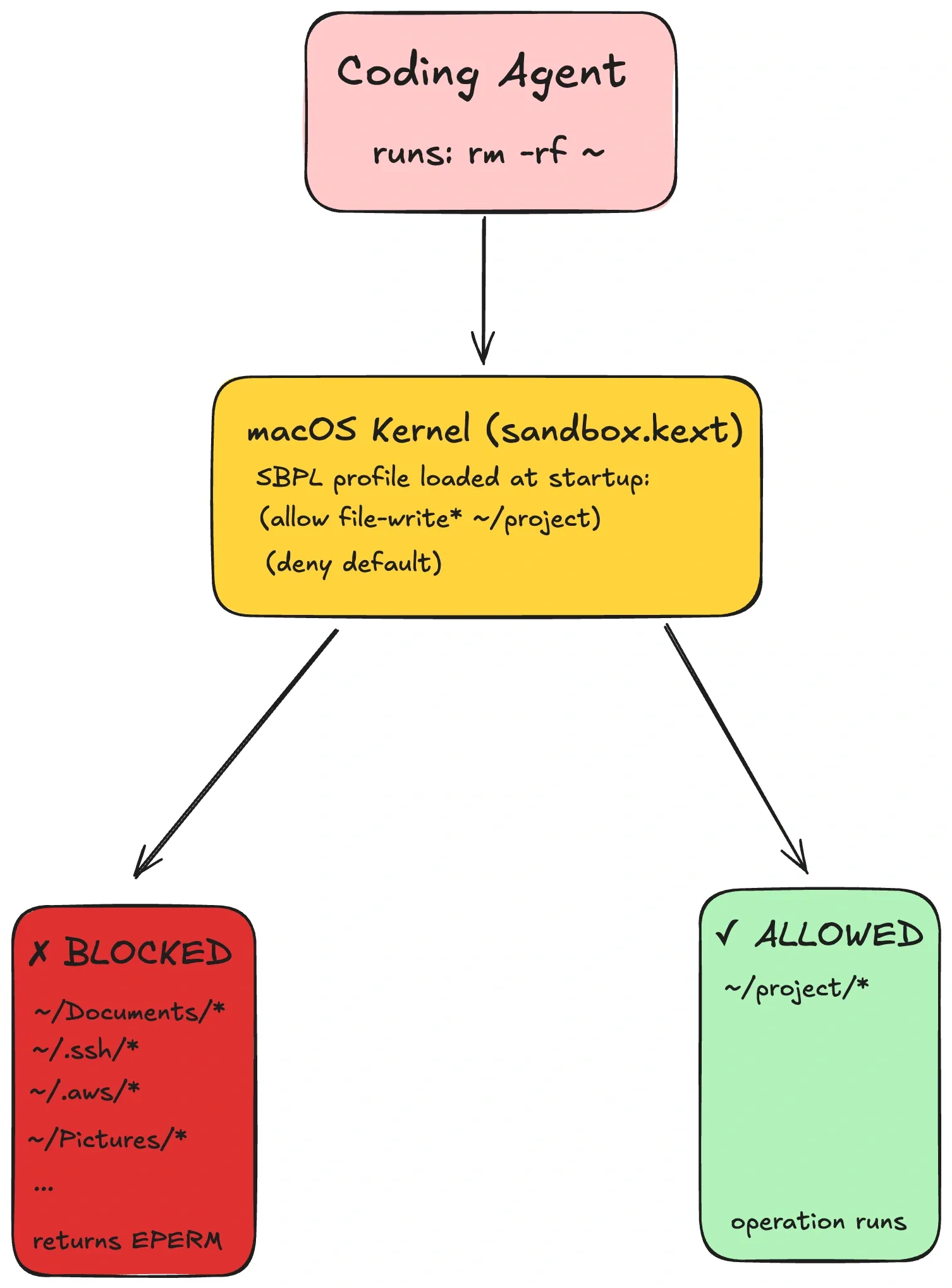
macOS enforces sandbox restrictions in the kernel. Apple’s supported App Sandbox is configured through code-signing entitlements and APIs for scoped resource access. CLI tools can also use custom Seatbelt profiles, but SBPL and the old sandbox_init interface are unsupported for third-party development; sandbox-exec is deprecated. Apple’s explanation of the distinction.
A custom profile can restrict filesystem operations, with denials commonly returning EPERM. That remains dependent on correct policy and kernel enforcement, not an absolute guarantee against escape.
For destination-based network policy, use a host-side allowlisting proxy and restrict the sandbox’s direct egress. Do not assume an SBPL remote rule accepts arbitrary hostnames: Microsoft’s Seatbelt backend documentation documents that limitation and uses a proxy for hostname filtering. A filesystem-only fragment would also omit the rules needed to start a normal shell or language runtime, so a complete policy must be tested as a whole.
Linux Landlock (+ seccomp)
Landlock is a Linux Security Module for unprivileged self-sandboxing. It can restrict selected filesystem and, depending on the supported ABI, network and IPC operations. Restrictions are irreversible and inherited by descendants, but only the configured access classes are covered; pre-existing file descriptors and sibling threads require care. Landlock documentation.
In most setups, Landlock pairs well with seccomp: Landlock controls filesystem paths; seccomp blocks high-risk syscalls (ptrace, mount, etc).
Query the enabled Landlock ABI, create a ruleset covering the required access classes, add its rules, and enforce it before starting the workload. The portable unprivileged setup also sets no_new_privs before calling landlock_restrict_self with zero flags. Check every result and stop if a required protection cannot be installed; otherwise the workload may run unrestricted. The kernel’s complete example includes these checks.
Because the restriction can’t be disabled and is inherited by children, Landlock suits tools that must run without touching anything beyond their allowed resources.
landrun wraps Landlock in a CLI. Filesystem support began with Linux 5.13 (ABI 1), and TCP bind/connect port rules with 6.7 (ABI 4). Those are feature minimums, not sufficient requirements for every wrapper release: current landrun defaults require newer ABI features. Check the enabled ABI and the wrapper version, and do not silently accept degraded protection. Port rules alone do not filter remote IP addresses or hostnames.
Windows AppContainer
AppContainer adds a package SID and optional capability SIDs to a restricted Windows process token. For protected resources, permitted access is the intersection of the user’s rights and the AppContainer’s rights. Workspace access depends on ACLs for those identities, while regular AppContainers also receive some baseline system access. Network capabilities are not a per-domain allowlist. Microsoft AppContainer guide.
It is an OS-native option for restricting a Windows tool without a VM. Setup involves explicit process-token, capability, and ACL configuration; changing resource ACLs requires ownership or the appropriate permission. Windows ACL requirements.
Comparison
| Aspect | macOS Seatbelt | Linux Landlock + seccomp | Windows AppContainer |
|---|---|---|---|
| Privilege required | supported App Sandbox requires signing/entitlement setup | unprivileged when enabled; required ABI must be available | per-user launch; ACL setup needs permission |
| Filesystem control | entitlements/scoped access, or unsupported custom profiles | handled access classes and path rulesets | ACLs for package/capability SIDs |
| Network control | entitlements or profile rules; proxy for destinations | ABI-dependent port/IPC controls; other layers for destinations | network capabilities; other layers for destinations |
| What it doesn’t solve | kernel vulnerabilities | kernel vulnerabilities | kernel vulnerabilities |
One operational pitfall across all local sandboxes: you have to allow enough for the program to function. Dynamic linkers, language runtimes, certificate stores, and temp directories are all “real” dependencies. A deny-by-default policy that omits required system resources can fail in confusing ways; the necessary files and access mechanisms vary by OS and runtime.
Treat profiles as code: version them, test them, and expect them to evolve as your agent’s needs change.
I only run my coding agents with a sandbox enabled, and I advise others to do the same.